
My Aranet4 has been sitting on my desk for over a year. It’s a great sensor — accurate CO2, temperature, humidity, and barometric pressure readings in a compact e-ink package. But every time I wanted to check my data, I had to pull out my phone, open the Aranet app, wait for a Bluetooth connection, and scroll through a clunky interface that couldn’t export anything useful.
The data was mine. I just couldn’t get to it.
So I built a Rust workspace that talks directly to Aranet sensors over Bluetooth Low Energy, stores readings locally in SQLite, and exposes everything through the interfaces I actually want: a CLI, a terminal dashboard, a desktop GUI, a REST API, Prometheus metrics, MQTT, and webhooks. Seven crates. Zero cloud dependencies.
Why Environmental Monitoring Matters
This isn’t just a hardware hacking exercise. Indoor CO2 levels have a measurable impact on cognitive performance. Studies show that levels above 1,000 ppm — common in poorly ventilated offices and bedrooms — can reduce decision-making ability by 11-23%. Above 2,500 ppm, cognitive function drops dramatically.
Radon is even more consequential. It’s the second leading cause of lung cancer and you can’t detect it without a sensor. The EPA estimates that radon causes about 21,000 lung cancer deaths per year in the US alone.
The sensors exist. Aranet makes excellent ones. But the data pipeline between sensor and actionable insight was broken — locked behind a mobile app with no automation, no local storage, and no integration path for the monitoring infrastructure I already run.
Starting at the Bottom: BLE Protocol Reverse Engineering
The first challenge was understanding how Aranet devices communicate over Bluetooth Low Energy. There’s no official protocol documentation. The Aranet4-Python project provided a starting point, but I needed to support four device families (Aranet4, Aranet2, AranetRn+, and Aranet Radiation), each with different data formats.
BLE devices broadcast advertisements — small packets of data that nearby receivers can pick up without establishing a connection. Aranet sensors embed their current readings in these advertisements, which means you can monitor them passively.
Here’s where the protocol gets interesting. Aranet4 was the first device and its advertisement format doesn’t include a device-type prefix. Later devices (Aranet2, AranetRn+, Aranet Radiation) prepend a type byte. The parser has to handle this inconsistency:
pub fn parse_advertisement_with_name(
    data: &[u8],
    name: Option<&str>,
) -> Result<AdvertisementData> {
    let is_aranet4_by_name = name
        .map(|n| n.starts_with("Aranet4"))
        .unwrap_or(false);
    let is_aranet4_by_len = data.len() == 7 || data.len() == 22;

    let (device_type, sensor_data) = if is_aranet4_by_name || is_aranet4_by_len {
        // Aranet4: no device-type prefix — detect by name or data length
        (DeviceType::Aranet4, data)
    } else {
        let device_type = match data[0] {
            0x01 => DeviceType::Aranet2,
            0x02 => DeviceType::AranetRadiation,
            0x03 => DeviceType::AranetRadon,
            other => return Err(Error::InvalidData(
                format!("Unknown device type byte: 0x{:02X}", other),
            )),
        };
        (device_type, &data[1..])
    };
    // ...
}
This is the kind of firmware quirk you only discover by sniffing packets. The Aranet4 was designed before multi-device support existed, so its format is a special case forever. Working around it cleanly, rather than hacking it, was important — this code runs on every single BLE advertisement the system receives.

Dealing with BLE’s Unreliability
Anyone who’s worked with Bluetooth knows it’s flaky. Devices disappear, connections drop, scans return empty. A monitoring tool that crashes or hangs when BLE misbehaves is useless.
The scanner uses exponential backoff with a cap, retrying both failed scans and empty results:
pub async fn scan_with_retry(
    options: ScanOptions,
    max_retries: u32,
    retry_on_empty: bool,
) -> Result<Vec<DiscoveredDevice>> {
    let mut attempt = 0;
    let mut delay = Duration::from_millis(500);

    loop {
        match scan_with_options(options.clone()).await {
            Ok(devices) if devices.is_empty()
                && retry_on_empty
                && attempt < max_retries =>
            {
                attempt += 1;
                warn!("No devices found, retrying ({}/{})...", attempt, max_retries);
                sleep(delay).await;
                delay = delay.saturating_mul(2).min(Duration::from_secs(5));
            }
            Ok(devices) => return Ok(devices),
            Err(e) if attempt < max_retries => {
                attempt += 1;
                warn!("Scan failed ({}), retrying ({}/{})...", e, attempt, max_retries);
                sleep(delay).await;
                delay = delay.saturating_mul(2).min(Duration::from_secs(5));
            }
            Err(e) => return Err(e),
        }
    }
}
The saturating_mul prevents overflow on the delay, and the 5-second cap keeps retries responsive. The retry_on_empty flag is important — sometimes you want to distinguish “no devices nearby” from “BLE stack isn’t ready yet.” This is a small function, but it’s the difference between a tool that works on a bench and one that works in production.
On Linux, there’s an additional challenge: BlueZ (the Linux Bluetooth stack) can trigger pairing dialogs that hang BLE operations indefinitely. The core library automatically registers a BlueZ agent to suppress these prompts. These are the kind of platform-specific sharp edges that take longer to debug than the core protocol work.
The Seven-Crate Architecture
Environmental monitoring spans a surprisingly deep stack: hardware communication, data persistence, multiple user interfaces, and integration with external systems. Cramming all of that into a single crate would be unmaintainable. Splitting it into seven crates with clear boundaries keeps each piece focused and testable.
aranet/
├── crates/
│   ├── aranet-types/    # Platform-agnostic shared types
│   ├── aranet-core/     # BLE communication + protocol parsing
│   ├── aranet-store/    # SQLite persistence + sync logic
│   ├── aranet-service/  # REST API, WebSocket, MQTT, Prometheus
│   ├── aranet-cli/      # Command-line interface
│   ├── aranet-tui/      # Terminal dashboard (ratatui)
│   └── aranet-gui/      # Desktop GUI (egui)
The dependency graph flows strictly downward. aranet-types has no dependencies on other workspace crates. aranet-core depends only on aranet-types. aranet-store depends on aranet-types and aranet-core. The three interface crates (cli, tui, gui) and aranet-service sit at the top, consuming the lower layers.
This means adding a new interface — say, a web dashboard or a Home Assistant component — requires zero changes to the sensor communication or storage layers. The separation also means each crate compiles independently, which matters when cross-compiling for ARM targets like a Raspberry Pi.
Local-First Data: SQLite and Incremental Sync
Aranet devices store history in an onboard ring buffer. Downloading that history over BLE is slow — each record requires a round-trip. Re-downloading everything on every sync would be painful.
The aranet-store crate tracks sync progress per device. On the first sync, it downloads all records. On subsequent syncs, it calculates the start index from the last checkpoint and only fetches new records:
/// Incremental Sync Algorithm:
///
/// 1. Read device's current `total_readings` count
/// 2. Call `Store::calculate_sync_start` to get start index
/// 3. Download records from `start_index` to `total_readings`
/// 4. Call `Store::update_sync_state` to save progress
///
/// First sync downloads all 500 records:
///   let start = store.calculate_sync_start("Aranet4 17C3C", 500)?;
///   assert_eq!(start, 1);
///
/// Next sync — device now has 510 records:
///   let start = store.calculate_sync_start("Aranet4 17C3C", 510)?;
///   assert_eq!(start, 501); // Only download 10 new records
Records are deduplicated at the SQLite level by (device_id, timestamp) pairs. This handles edge cases where the ring buffer wraps around or the device resets — you never get duplicate readings in your local store.
The local-first approach is deliberate. Your data lives on your machine, in a standard SQLite database you can query with any tool. No account required. No API rate limits. No vendor deciding to shut down or change pricing. If the Aranet mobile app disappeared tomorrow, this toolkit wouldn’t notice.

The Terminal Dashboard
The CLI handles one-off reads and scripting, but for day-to-day monitoring I wanted something I could leave running in a tmux pane. The TUI, built with ratatui, provides real-time multi-device monitoring with sparkline charts and threshold alerts.
It supports vim keybindings (naturally), light and dark themes, mouse interaction, CSV export, and device comparison views. CO2 readings above 1,000 ppm turn yellow; above 1,500 ppm, red — deliberately conservative, since cognitive effects are measurable well before the 2,500 ppm level where they become severe. Radon alerts follow EPA action levels. An audio bell fires when thresholds are crossed — useful when the dashboard is running on a secondary monitor.
The sparkline charts show min/max labels and adapt to terminal width. It’s the kind of information density that a mobile app can’t match.
Desktop GUI
For less terminal-inclined users (or when I want a persistent window rather than a terminal pane), aranet-gui provides a desktop application built with egui:
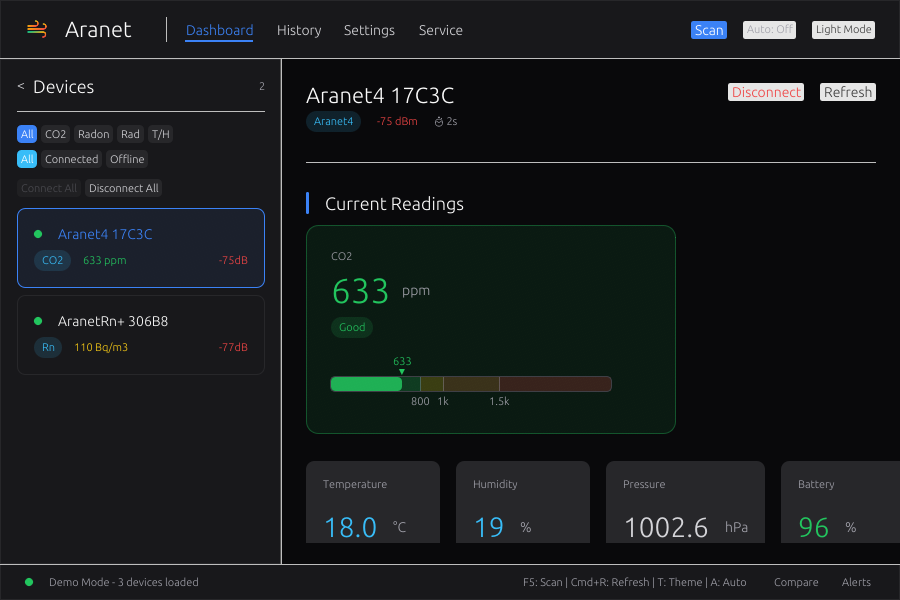
Multi-panel interface with device list, detail views, history charts, comparison mode, and a configurable alert system. It exports to CSV and JSON, supports light and dark themes, and includes a service management panel for controlling aranet-service directly from the GUI.
From Sensors to Grafana: The Service Layer
The aranet-service crate ties everything together as a background daemon. It exposes a REST API for querying devices and readings, WebSocket streaming for real-time updates, and a Prometheus metrics endpoint that makes Aranet data available to existing monitoring infrastructure.
The Prometheus integration filters metrics by device capability — Aranet2 sensors don’t have CO2, so they shouldn’t emit aranet_co2_ppm metrics:
for (device, reading) in &device_readings {
    let device_type = resolve_device_type(device);

    if device_type.is_none_or(|dt| dt.has_co2()) && reading.co2 > 0 {
        co2_lines.push(format!(
            "aranet_co2_ppm{{{}}} {}\n", labels, reading.co2
        ));
    }
    if device_type.is_none_or(|dt| dt.has_temperature()) {
        temp_lines.push(format!(
            "aranet_temperature_celsius{{{}}} {:.2}\n",
            labels, reading.temperature
        ));
    }
}
The project ships with a pre-built Grafana dashboard template and a Docker Compose stack that spins up the service, Prometheus, and Grafana together. One docker compose up -d and you have a complete monitoring stack scraping your Aranet sensors.
MQTT publishing with Home Assistant auto-discovery means the sensors automatically appear in HA without manual configuration. Webhook notifications can ping Slack, Discord, or PagerDuty when thresholds are crossed. InfluxDB export is available for users who prefer that over Prometheus.
Why Rust for IoT
Environmental monitoring runs continuously on modest hardware — often a Raspberry Pi tucked behind a bookshelf. Rust’s zero-cost abstractions and memory safety aren’t academic niceties here; they’re practical requirements for a long-running BLE daemon that needs to be reliable without consuming resources.
The async runtime (Tokio) handles concurrent BLE scanning, API serving, MQTT publishing, and metric collection without threading complexity. The type system catches protocol parsing errors at compile time rather than in production at 3 AM. And the workspace structure means each crate carries only the dependencies it needs — the CLI binary doesn’t link against egui, and the GUI doesn’t pull in the Prometheus library.
Cross-compilation to aarch64-unknown-linux-gnu (Raspberry Pi) works out of the box with cross. The CI pipeline builds and tests on macOS, Linux, and Windows.
Distribution: Meeting Users Where They Are
A tool nobody can install is a tool nobody uses. The project ships through multiple channels:
# Homebrew (macOS/Linux)
brew tap cameronrye/aranet && brew install aranet

# crates.io
cargo install aranet-cli

# Shell installer (macOS/Linux)
curl --proto '=https' --tlsv1.2 -LsSf \
  https://github.com/cameronrye/aranet/releases/latest/download/aranet-cli-installer.sh | sh

# Docker (full monitoring stack)
docker compose up -d
GitHub Releases include shell and PowerShell installers plus macOS DMG bundles for the GUI. The goal is that however someone prefers to install software, there’s a path that works.

Liberating Your Data
The broader motivation behind this project goes beyond Aranet sensors. Hardware manufacturers increasingly treat the data your devices produce as something that flows through their cloud, their app, their ecosystem. You bought the sensor, but you’re renting access to your own measurements.
Aranet is actually better than most — the sensors work entirely offline and the BLE protocol is straightforward to reverse-engineer. But the tooling gap between “sensor produces data” and “data is useful” was still filled entirely by a mobile app with no export, no API, and no automation.
Building from BLE packets up through storage, APIs, and dashboards in a single workspace proves that this gap doesn’t need to exist. Your environmental data can live on your hardware, in standard formats, queryable by standard tools, integrated into the infrastructure you already run. No account required.
The project is open source on GitHub and published to crates.io. If you have an Aranet sensor, brew install aranet and run aranet scan — your data is waiting.
Was this helpful?
Have questions about this article?
Ask can help explain concepts, provide context, or point you to related content.